ラベル Ubuntu の投稿を表示しています。 すべての投稿を表示

2019年3月21日木曜日

Docker コンテナが [!!!!!!] Failed to early mount API filesystems, freezing. と言って死ぬときの回避策

TL;DR

コンテナを init で起動すると死ぬ。

$ docker run -it ubuntu:16.04 init
[!!!!!!] Failed to early mount API filesystems, freezing.

--cap-add=SYS_ADMIN と -v /sys/fs/cgroup:/sys/fs/cgroup:ro を付けたら行けた。

$ docker run -it --cap-add=SYS_ADMIN -v /sys/fs/cgroup:/sys/fs/cgroup:ro ubuntu:16.04 init
systemd 229 running in system mode. (+PAM +AUDIT +SELINUX +IMA +APPARMOR +SMACK +SYSVINIT +UTMP +LIBCRYPTSETUP +GCRYPT +GNUTLS +ACL +XZ -LZ4 +SECCOMP +BLKID +ELFUTILS +KMOD -IDN)
Detected virtualization vm-other.
Detected architecture x86-64.

Welcome to Ubuntu 16.04.5 LTS!

 ...

何か起きたか

ansible で systemd 辺りをセットアップする playbook を書いたため検証しようと思ったが、わざわざ仮想マシンを起こすのもめんどくさかった。
ので、コンテナの中で systemd を、ひいては init を起こした。

docker run -it ubuntu:16.04 init

すると、 [!!!!!!] Failed to early mount API filesystems, freezing. と出力して死んだ。

何が問題だったか

どうやらコンテナ起動コマンドを init にすると、諸々の権限が足りず起動に失敗するらしい。
( 詳細までは元気が足りず調べられていない )

解決策 or 回避策

docker run するときに capability SYS_ADMIN を追加した上で、/sys/fs/cgroup を読み込み専用でマウントしてやると起動できた。

docker run -it --cap-add=SYS_ADMIN -v /sys/fs/cgroup:/sys/fs/cgroup:ro ubuntu:16.04 init

備考

最初に Google 先生に聞いてみたときには、 docker run するときに --privileged オプションを付けて特権モードで起動しろなどという恐ろしい助言が出てきたが、試してみると確かに init は起こせた。

しかし、複数のコンテナを --privileged で起動すると謎の CPU の高騰に悩まされた。
( 確か。結構昔のことなので正確に覚えていない。 )

できることなら特権を与えるなんて危険なことはしたくなかったので、もうちょっと権限を絞りたいと思って色々試したところ、↑な感じで行けた。

SYS_ADMIN よりも細かく capabilities を絞ってできるかどうかは試せていない。


参考

2019年3月16日土曜日

tcpdump を時限開始して自動で停止させる

tcpdump を時間を指定して実行したいけど、 わざわざ cron を設定したくなかった。

以下例では、 2019 年 3 月 16 日 10:00 AM に tcpdump を開始し、 300 秒後に終了する。

while sleep 0.1; do
  if [ $(date +%Y%m%d%H%M) -ge 201903161000 ]; then
    sudo tcpdump -G300 -W1 -vvv -n -p -s 65535 -w "$(uname -n)_%Y%m%dT%H%M%S.pcap"
    break
  fi
done
  • tcpdump
    • -G {数字}: {数字}秒間実行する
    • -W {数字}: {数字}回ローテートする
    • -n: IPアドレスやポートをそのまま表示する
    • -p: プロミスキャスモード を有効にしない
    • -s: キャプチャするサイズを指定する ( MTUより大きくすれば OK )

2019年3月13日水曜日

diff コマンドに色をつけたいけど colordiff みたいな別のコマンドはインストールしたくない

色付き diff が見たいたいけど colordiff みたいな別のコマンドはインストールしたくないシーンがあったので、 プレーンな diff コマンドに bash で、というか主に sed で、無理やり色をつけました。
ssh先 ( 最近だと kubectl exec ですかね ) のサーバーで色付き diff が欲しい時に重宝します。

difff() {(R=$(printf '\e[31m');G=$(printf '\e[32m');B=$(printf '\e[36m');W=$(printf '\e[1m');N=$(printf '\e[0m');diff -u "$@"|sed $(uname -s|grep -q '^Darwin'&&printf -- -E||printf -- -r) "s/^(@@.+@@|@@.+@@)$/$B\1$N/g;s/^(\+.*)$/$G\1$N/g;s/^(\-.*)$/$R\1$N/g;s/^[^\+\-]*((\+{3}|-{3}) [^ ].*)/$W\1/g;")}

実行例はこちら。

$ difff A.txt B.txt

git diff で見慣れた感じで出すようにしています。

Ubuntu 16.04, 同 18.04, CentOS 7, Alpine Linux (2019-03-12 時点で latest で降ってきたやつ) 辺りで動作確認済み。

-r オプションないし -E オプションがある sed + POSIX な環境であれば動くんじゃないかなと思います。

production 環境で apt install colordiff とか yum install colordiff とか apk --add colordiff なんて罪深いことはやりたくないです。

2018年2月4日日曜日

dpkg/apt/rpm/yumでインストールしたパッケージについて、パッケージの情報やファイルのインストール場所等を確認する

パッケージをインストールしたは良いけど、
どこに何が展開されたか?を確認したいとき用。

以下コマンドで確認できる。

RedHat系の場合

rpm -lqi <パッケージ名>

Debian系の場合

dpkg -s <パッケージ名>
dpkg -L <パッケージ名>

以下、具体例。

  • rpm -lqi <パッケージ名>
$ sudo rpm -lqi openldap-clients
Name        : openldap-clients
Version     : 2.4.44
Release     : 5.el7
Architecture: x86_64
Install Date: Fri 04 Sun 2018 10:00:00 AM JST
Group       : Applications/Internet
Size        : 583815
License     : OpenLDAP
Signature   : RSA/SHA256, Fri 11 Aug 2017 03:38:04 AM JST, Key ID 24c6a8a7f4a80eb5
Source RPM  : openldap-2.4.44-5.el7.src.rpm
Build Date  : Fri 04 Aug 2017 11:24:19 PM JST
Build Host  : c1bm.rdu2.centos.org
Relocations : (not relocatable)
Packager    : CentOS BuildSystem <http://bugs.centos.org>
Vendor      : CentOS
URL         : http://www.openldap.org/
Summary     : LDAP client utilities
Description :
OpenLDAP is an open-source suite of LDAP (Lightweight Directory Access
Protocol) applications and development tools. LDAP is a set of
protocols for accessing directory services (usually phone book style
information, but other information is possible) over the Internet,
similar to the way DNS (Domain Name System) information is propagated
over the Internet. The openldap-clients package contains the client
programs needed for accessing and modifying OpenLDAP directories.
/usr/bin/ldapadd
/usr/bin/ldapcompare
/usr/bin/ldapdelete
/usr/bin/ldapexop
/usr/bin/ldapmodify
/usr/bin/ldapmodrdn
/usr/bin/ldappasswd
/usr/bin/ldapsearch
/usr/bin/ldapurl
/usr/bin/ldapwhoami
/usr/share/man/man1/ldapadd.1.gz
/usr/share/man/man1/ldapcompare.1.gz
/usr/share/man/man1/ldapdelete.1.gz
/usr/share/man/man1/ldapexop.1.gz
/usr/share/man/man1/ldapmodify.1.gz
/usr/share/man/man1/ldapmodrdn.1.gz
/usr/share/man/man1/ldappasswd.1.gz
/usr/share/man/man1/ldapsearch.1.gz
/usr/share/man/man1/ldapurl.1.gz
/usr/share/man/man1/ldapwhoami.1.gz
  • dpkg -s <パッケージ名>; dpkg -L <パッケージ名>
$ sudo dpkg -s ldap-utils
Package: ldap-utils
Status: install ok installed
Priority: optional
Section: net
Installed-Size: 675
Maintainer: Ubuntu Developers <ubuntu-devel-discuss@lists.ubuntu.com>
Architecture: amd64
Source: openldap
Version: 2.4.42+dfsg-2ubuntu3.2
Replaces: openldap-utils, openldapd, slapd (<< 2.2.23-0.pre6)
Provides: ldap-client, openldap-utils
Depends: libc6 (>= 2.14), libldap-2.4-2 (= 2.4.42+dfsg-2ubuntu3.2), libsasl2-2
Recommends: libsasl2-modules
Suggests: libsasl2-modules-gssapi-mit | libsasl2-modules-gssapi-heimdal
Conflicts: ldap-client, openldap-utils, umich-ldap-utils
Description: OpenLDAP utilities
 This package provides utilities from the OpenLDAP (Lightweight
 Directory Access Protocol) package. These utilities can access a
 local or remote LDAP server and contain all the client programs
 required to access LDAP servers.
Homepage: http://www.openldap.org/
Original-Maintainer: Debian OpenLDAP Maintainers <pkg-openldap-devel@lists.alioth.debian.org>

$ dpkg -L ldap-utils
/.
/usr
/usr/bin
/usr/bin/ldapmodify
/usr/bin/ldapexop
/usr/bin/ldapurl
/usr/bin/ldapsearch
/usr/bin/ldapwhoami
/usr/bin/ldapcompare
/usr/bin/ldappasswd
/usr/bin/ldapmodrdn
/usr/bin/ldapdelete
/usr/share
/usr/share/man
/usr/share/man/man5
/usr/share/man/man5/ldif.5.gz
/usr/share/man/man1
/usr/share/man/man1/ldapmodify.1.gz
/usr/share/man/man1/ldappasswd.1.gz
/usr/share/man/man1/ldapmodrdn.1.gz
/usr/share/man/man1/ldapsearch.1.gz
/usr/share/man/man1/ldapcompare.1.gz
/usr/share/man/man1/ldapdelete.1.gz
/usr/share/man/man1/ldapadd.1.gz
/usr/share/man/man1/ldapwhoami.1.gz
/usr/share/man/man1/ldapurl.1.gz
/usr/share/man/man1/ldapexop.1.gz
/usr/share/doc
/usr/share/doc/ldap-utils
/usr/share/doc/ldap-utils/README.Debian
/usr/share/doc/ldap-utils/copyright
/usr/bin/ldapadd
/usr/share/doc/ldap-utils/changelog.Debian.gz

2018年2月3日土曜日

【コピペ用Tips】ldapsearchコマンド

# vars
_ldapuri=ldap://ldap.example.com/
_binddn=cn=user01,ou=administrators,dc=example,dc=com
_basedn=dc=example,dc=com

# command
ldapsearch -v -LLL -H $_ldapuri -D $_binddn -W -b $_basedn "(objectClass=*)"

ちょっとだけ解説。

  • -v: 詳細を出力する(stderrへ出力)
  • -LLL: レスポンスをコメントなしでLDIF形式で出力する
  • -H: 接続するLDAPサーバのURIを指定
  • -D: bindユーザのDN(distinguished name)を指定
  • -W: bindユーザのパスワードをプロンプトから入力する
  • -b: サーチベースDNを指定
  • "(...)": LDAPフィルタ

Ubuntu、CentOSへのインストールについてはこちら

2018年2月2日金曜日

Ubuntuにldapsearch/ldapadd/ldapmodify/ldapwhoami等各種コマンドをインストール

結論から。

sudo apt -y install ldap-utils

無事インストールできました。

$ ldapsearch -V
ldapsearch: @(#) $OpenLDAP: ldapsearch  (Ubuntu) (May 30 2017 19:20:53) $
        buildd@lgw01-18:/build/openldap-JXEADB/openldap-2.4.42+dfsg/debian/build/clients/tools
        (LDAP library: OpenLDAP 20442)

CentOS だったらこんな感じですね。

sudo yum -y install openldap-clients
$ ldapsearch -V
ldapsearch: @(#) $OpenLDAP: ldapsearch 2.4.44 (Aug  4 2017 14:23:23) $
        mockbuild@c1bm.rdu2.centos.org:/builddir/build/BUILD/openldap-2.4.44/openldap-2.4.44/clients/tools
        (LDAP library: OpenLDAP 20444)

普段 CentOS ユーザなので、ちょっと迷いました。

$ sudo apt list *openldap*
Listing... Done
golang-openldap-dev/xenial 0.2-1 all

$ sudo apt list *ldap*
Listing... Done
aolserver4-nsldap/xenial 0.8-4build1 amd64
argonaut-ldap2zone/xenial 0.9.2-1 all
autofs-ldap/xenial-updates 5.1.1-1ubuntu3.1 amd64
autofs5-ldap/xenial-updates 5.1.1-1ubuntu3.1 all
bind9-dyndb-ldap/xenial 8.0-4 amd64
buildapp/xenial 1.5.5-1 amd64
courier-authlib-ldap/xenial 0.66.4-3build1 amd64
courier-ldap/xenial 0.68.2-1ubuntu7 amd64
dlz-ldap-enum/xenial 1.0.3-1 amd64
dovecot-ldap/xenial-updates,xenial-security 1:2.2.22-1ubuntu2.4 amd64
erlang-eldap/xenial 1:18.3-dfsg-1ubuntu3 amd64
freeradius-ldap/xenial-updates,xenial-security 2.2.8+dfsg-0.1ubuntu0.1 amd64
fts-fai-ldap/xenial 1.1-2 all
fts-ltsp-ldap/xenial 1.1-2 all
fusiondirectory-plugin-ldapdump/xenial 1.0.8.8-3ubuntu2 all
fusiondirectory-plugin-ldapmanager/xenial 1.0.8.8-3ubuntu2 all
fusionforge-plugin-authldap/xenial 6.0.3+20151023-1ubuntu1 all
fusionforge-plugin-sysauthldap/xenial 6.0.3+20151023-1ubuntu1 all
golang-github-go-ldap-ldap-dev/xenial 0.0~git20150817.24.12f2865-1 all
golang-openldap-dev/xenial 0.2-1 all
gosa-plugin-ldapmanager/xenial 2.7.4+reloaded2-9ubuntu1 all
isc-dhcp-server-ldap/xenial-updates 4.3.3-5ubuntu12.7 amd64
jmeter-ldap/xenial 2.11-5 all
kamailio-ldap-modules/xenial 4.3.4-1.1ubuntu2 amd64
krb5-kdc-ldap/xenial-updates 1.13.2+dfsg-5ubuntu2 amd64
lcmaps-plugins-basic-ldap/xenial 1.6.1-3 amd64
ldap-account-manager/xenial 5.2-1ubuntu1 all
ldap-account-manager-lamdaemon/xenial 5.2-1ubuntu1 all
ldap-auth-client/xenial 0.5.3 all
ldap-auth-config/xenial 0.5.3 all
ldap-git-backup/xenial 1.0.7-1 all
ldap-utils/xenial-updates,xenial-security 2.4.42+dfsg-2ubuntu3.2 amd64
ldap2dns/xenial 0.3.1-3.1 amd64
ldap2zone/xenial 0.2-8 amd64
ldapscripts/xenial 2.0.6-1ubuntu1 all
ldaptor-doc/xenial 0.0.43+debian1-7 all
ldaptor-utils/xenial 0.0.43+debian1-7 all
ldapvi/xenial 1.7-10 amd64
lemonldap-ng/xenial 1.4.6-3 all
lemonldap-ng-doc/xenial 1.4.6-3 all
libapache-authznetldap-perl/xenial 0.07-6 all
libapache-session-ldap-perl/xenial 0.4-1 all
libapache2-mod-ldap-userdir/xenial 1.1.19-2.1 amd64
libapache2-mod-ldap-userdir-dbg/xenial 1.1.19-2.1 amd64
libapache2-mod-vhost-ldap/xenial 2.4.0-1 amd64
libapache2-mod-webauthldap/xenial 4.7.0-3build1 amd64
libaprutil1-ldap/xenial 1.5.4-1build1 amd64
libauthen-simple-ldap-perl/xenial 0.3-1 all
libdbd-ldap-perl/xenial 0.20-1 all
libghc-ldap-dev/xenial 0.6.10-5 amd64
libghc-ldap-doc/xenial 0.6.10-5 all
libghc-ldap-prof/xenial 0.6.10-5 amd64
libkf5ldap-dbg/xenial 15.12.3-0ubuntu1 amd64
libkf5ldap-dev/xenial 15.12.3-0ubuntu1 amd64
libkf5ldap5/xenial 15.12.3-0ubuntu1 amd64
libkldap4/xenial 4:4.14.10-1ubuntu2 amd64
libldap-2.4-2/xenial-updates,xenial-security,now 2.4.42+dfsg-2ubuntu3.2 amd64 [installed]
libldap-2.4-2-dbg/xenial-updates,xenial-security 2.4.42+dfsg-2ubuntu3.2 amd64
libldap-java/xenial 4.18+dfsg1-1 all
libldap-ocaml-dev/xenial 2.1.8-10build1 amd64
libldap2-dev/xenial-updates,xenial-security 2.4.42+dfsg-2ubuntu3.2 amd64
liblemonldap-ng-common-perl/xenial 1.4.6-3 all
liblemonldap-ng-conf-perl/xenial 1.4.6-3 all
liblemonldap-ng-handler-perl/xenial 1.4.6-3 all
liblemonldap-ng-manager-perl/xenial 1.4.6-3 all
liblemonldap-ng-portal-perl/xenial 1.4.6-3 all
libmono-ldap4.0-cil/xenial 4.2.1.102+dfsg2-7ubuntu4 all
libmono-system-ldap-protocols4.0-cil/xenial 4.2.1.102+dfsg2-7ubuntu4 all
libmono-system-ldap4.0-cil/xenial 4.2.1.102+dfsg2-7ubuntu4 all
libmozilla-ldap-perl/xenial 1.5.3-2build2 amd64
libnet-ldap-filterbuilder-perl/xenial 1.0004-1 all
libnet-ldap-perl/xenial 1:0.6500+dfsg-1 all
libnet-ldap-server-perl/xenial 0.4-2 all
libnet-ldapapi-perl/xenial 3.0.3-7build5 amd64
libnss-ldap/xenial 265-3ubuntu2 amd64
libnss-ldapd/xenial 0.9.6-3 amd64
libpam-ldap/xenial 184-8.7ubuntu1 amd64
libpam-ldapd/xenial 0.9.6-3 amd64
libroot-net-ldap-dev/xenial 5.34.30-0ubuntu8 amd64
libroot-net-ldap5.34/xenial 5.34.30-0ubuntu8 amd64
libsasl2-modules-ldap/xenial 2.1.26.dfsg1-14build1 amd64
libtest-net-ldap-perl/xenial 0.07-1 all
libvt-ldap-java/xenial 3.3.8-1 all
libvt-ldap-java-doc/xenial 3.3.8-1 all
lua-ldap/xenial 1.1.0-1-geeac494-6 amd64
lua-ldap-dev/xenial 1.1.0-1-geeac494-6 amd64
nordugrid-arc-ldap-infosys/xenial 5.0.5-1ubuntu1 all
nordugrid-arc-ldap-monitor/xenial 5.0.5-1ubuntu1 all
openvpn-auth-ldap/xenial-updates 2.0.3-6.1ubuntu0.16.04.1 amd64
pdns-backend-ldap/xenial 4.0.0~alpha2-3build1 amd64
perdition-ldap/xenial 2.1-2build1 amd64
phamm-ldap/xenial 0.6.2-1.2ubuntu1 all
phamm-ldap-amavis/xenial 0.6.2-1.2ubuntu1 all
phamm-ldap-vacation/xenial 0.6.2-1.2ubuntu1 all
php-horde-ldap/xenial 2.3.2-1ubuntu1 all
php-ldap/xenial 1:7.0+35ubuntu6 all
php-net-ldap/xenial 1:1.1.5-3ubuntu1 all
php-net-ldap2/xenial 2.2.0-1ubuntu1 all
php-net-ldap3/xenial 1.0.3-1build1 all
php7.0-ldap/xenial-updates,xenial-security 7.0.22-0ubuntu0.16.04.1 amd64
phpldapadmin/xenial-updates,xenial-security 1.2.2-5.2ubuntu2.1 all
postfix-ldap/xenial-updates 3.1.0-3ubuntu0.2 amd64
proftpd-mod-ldap/xenial 1.3.5a-1build1 amd64
pure-ftpd-ldap/xenial 1.0.36-3.2build1 amd64
python-django-auth-ldap/xenial 1.2.7+dfsg-1 all
python-django-auth-ldap-doc/xenial 1.2.7+dfsg-1 all
python-django-ldapdb/xenial 0.2.0-1 all
python-django-python3-ldap/xenial 0.9.8-1 all
python-ldap/xenial 2.4.22-0.1 amd64
python-ldap-dbg/xenial 2.4.22-0.1 amd64
python-ldap3/xenial 1.0.3-1 all
python-ldappool/xenial 1.0-1ubuntu1 all
python-ldaptor/xenial 0.0.43+debian1-7 all
python-mockldap/xenial 0.2.5-1 all
python-mockldap-doc/xenial 0.2.5-1 all
python-schooltool.ldap/xenial 1.0.2-0ubuntu1 all
python3-django-python3-ldap/xenial 0.9.8-1 all
python3-ldap3/xenial 1.0.3-1 all
ruby-activeldap/xenial 4.0.3-2 all
ruby-activeldap-doc/xenial 4.0.3-2 all
ruby-ldap/xenial 0.9.16-1build6 amd64
ruby-net-ldap/xenial 0.8.0-1 all
ruby-omniauth-ldap/xenial 1.0.4-4 all
shelldap/xenial 1.3.1-2 all
simpleid-ldap/xenial 1.0.1-1ubuntu1 all
smbldap-tools/xenial-updates 0.9.9-1ubuntu1.16.04.2 all
sssd-ldap/xenial-updates,xenial-security 1.13.4-1ubuntu1.10 amd64
strongswan-plugin-ldap/xenial-updates 5.3.5-1ubuntu3.5 all
sudo-ldap/xenial-updates 1.8.16-0ubuntu1.5 amd64
tryton-modules-ldap-authentication/xenial 3.8.0-1 all
uwsgi-plugin-ldap/xenial-updates 2.0.12-5ubuntu3.1 amd64
web2ldap/xenial 1.1.43~dfsg-1 all

# どれ・・・?

2018年1月28日日曜日

CIDR表記のネットワークアドレスを計算する/指定したネットワークに属するIPアドレス一覧を出力する/そのIPアドレス群のPing応答を確認するスクリプト

CIDR表記のネットワークのネットワークアドレスを出力したり、
ブロードキャストアドレス以外のIPアドレスを一覧出力したり、
またそのIPアドレス群のPing応答を確認したりするbashスクリプトを、
個人的に欲しかったので、作りました。

https://gist.github.com/djeeno/fcd09b666a8e7bd6fc356b5f410f0ff5

CentOS7、Ubuntu16.04、Ubuntu16.04(WSL)、Debian9、macOS High Sierraで動作を確認しています。

使い方を以下に例示。

# IPアドレスを一覧出力: netaddr
$ ip.sh netaddr 192.168.100.50/29
192.168.100.48

# IPアドレスを一覧出力: list
$ ip.sh list 192.168.100.0/29
192.168.100.49
192.168.100.50
192.168.100.51
192.168.100.52
192.168.100.53
192.168.100.54

# IPアドレスに対してPingを飛ばし応答のあったアドレスを出力: inuse
$ ip.sh ping 192.168.100.1/29
192.168.100.49  ttl=64 Linu   time=7.43ms
192.168.100.50  ttl=128 Windows time=8.88ms
192.168.100.54  ttl=64   Linux    time=5.69ms

Ping応答のttlからOSを(ある程度)判別できるので、
「これが何のOSなのか」も横に出力するようにしました。

(と言っても、Linux or UNIX or Windowsの3択ですが…)


適当に立てたマシンがDHCPからどのIPアドレスを振られているか調べる時とか、非常に便利です。

2018年1月24日水曜日

世界一簡単な git コマンドのソースからのインストール for Linux

yum や apt などのパッケージ管理ツールでインストールできる git のバージョンは大抵かなり古いので、僕はいつもソースから最新版をインストールするようにしています。

sudo権限を持つユーザで以下を実行するだけ。

UbuntuなどDebian系の場合

install_git_from_source() { sudo bash -cx 'apt-get update && apt-get -y install lib{curl4-gnutls,expat1,ssl,z}-dev gcc gettext make wget && cd /usr/local/src && BASE_URL="https://www.kernel.org/pub/software/scm/git/" && wget -cSv "${BASE_URL}$(wget -qO- ${BASE_URL} | grep -o -E "git-[0-9\\.]+.tar.gz" | sort -uV | tail -n 1)" && tar vxzf $(basename $_) && cd $(basename -s .tar.gz $_) && make prefix=/usr/local all && make prefix=/usr/local install && git --version'; } && install_git_from_source

CentOSなどRHEL系の場合

install_git_from_source() { sudo bash -cx 'yum makecache fast && yum -y install {curl,expat,gettext,openssl,zlib}-devel gcc make perl-ExtUtils-MakeMaker wget && cd /usr/local/src && BASE_URL="https://www.kernel.org/pub/software/scm/git/" && wget -cSv "${BASE_URL}$(wget -qO- ${BASE_URL} | grep -o -E "git-[0-9\\.]+.tar.gz" | sort -uV | tail -n 1)" && tar vxzf $(basename $_) && cd $(basename -s .tar.gz $_) && make prefix=/usr/local all && make prefix=/usr/local install && git --version'; } && install_git_from_source

世界一簡単。

[user@localhost ~]$ git --version
git version 2.16.1

2018年1月22日月曜日

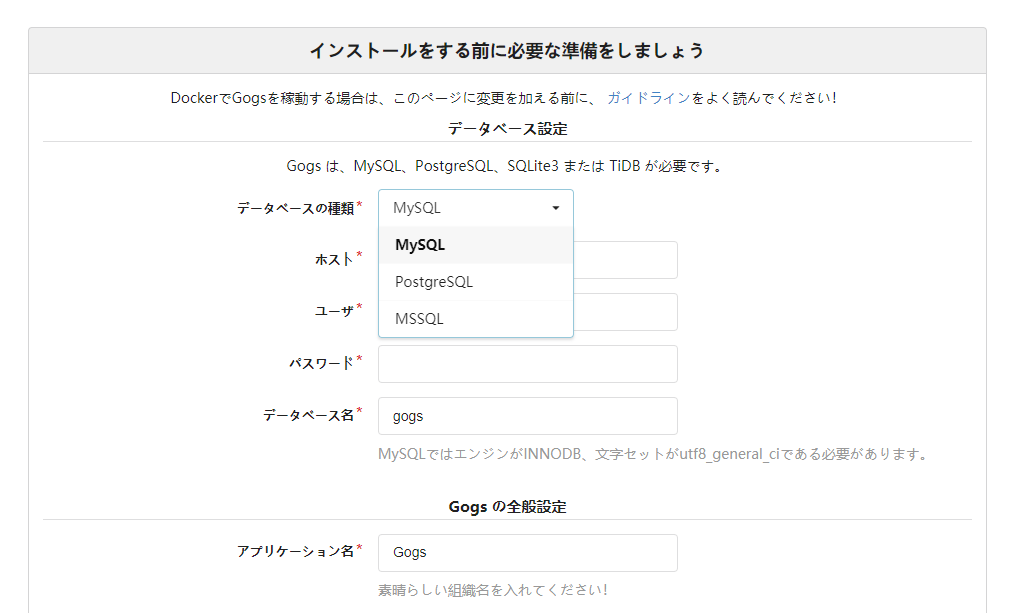
gogsをソースからインストールするとデータベースにSQLiteを選択できない?

gogsをソースからインストールするとデータベースにSQLiteを選択できない?

golang製のgithubクローンのgitサーバ【gogs】を、
ソースからインストールしたのですが、
タイトルでハマりました。

以下実際にやったインストール手順。

go get -u github.com/gogits/gogs
cd $GOPATH/go/src/github.com/gogits/gogs
go build

http://gogs.local:3000/

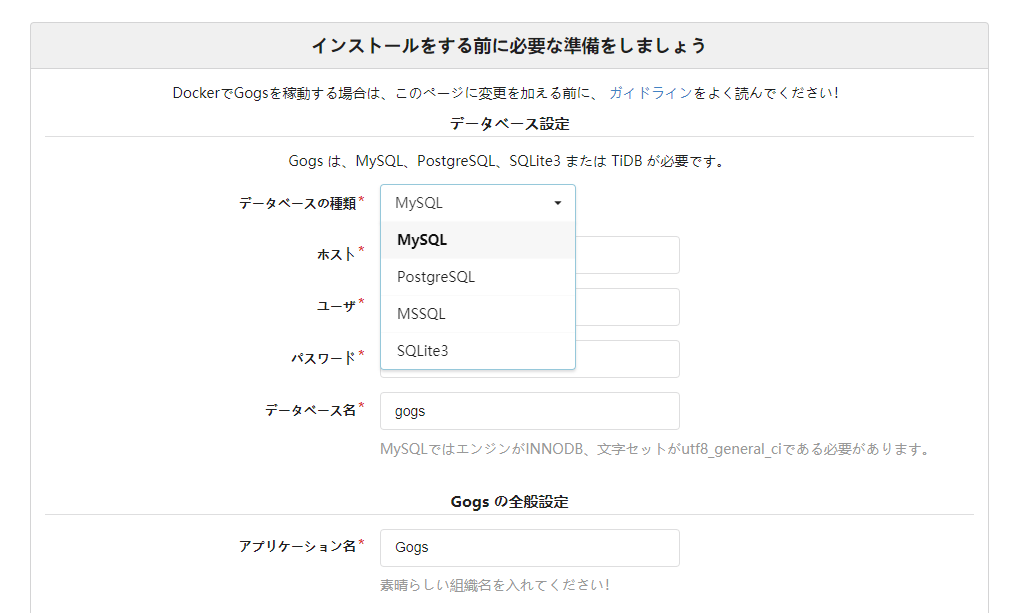
何故かSQLite3がドロップダウンリストに表示されません。

調べてみたところすぐに原因は判明しました。

From source - Gogs

めっちゃ普通に公式に書いてありました。

以下、抜粋。

A couple of things do not come with Gogs automatically, you need to compile Gogs with corresponding build tags.
Available build tags are:

  • sqlite3: SQLite3 database support
  • pam: PAM authentication support
  • cert: Generate self-signed certificates support
  • miniwinsvc: Builtin windows service support (or you can use NSSM to create a service)

For example, you want to support all of them, first delete directory
$GOPATH/pkg/${GOOS}_${GOARCH}/github.com/gogits/gogs and then do:

$ go get -u -tags "sqlite pam cert" github.com/gogits/gogs
$ cd $GOPATH/src/github.com/gogits/gogs
$ go build -tags "sqlite pam cert"

If you get error: fatal error: security/pam_appl.h: No such file or directory, then install missing package via sudo apt-get install libpam0g-dev.

要は上の通り「-tagsオプションをつけてビルドしてくださいね」ということでした。

実際にやってみると、

無事データベースにSQLite3を選択できるようになりました。